Duck Laser Engrave File: High-Res PNG Guide
Creating professional-looking laser projects often feels like a balancing act between artistic vision and technical limitations. Many hobbyists and small business owners struggle to find designs that translate well from a digital screen to physical materials like wood, leather, or acrylic. This is where a specialized Duck Laser Engrave File becomes an essential tool in your creative toolkit. Unlike standard clip art or low-resolution images, this specific design set is engineered to handle the nuances of laser engraving, ensuring that every feather, eye, and contour renders with precision.
The appeal of this particular file set lies in its versatility and technical optimization. It is not merely a picture of a duck; it is a high-resolution asset designed for 3D-ready effects on various substrates. Whether you are running a Glowforge, an xTool, a Sculpfun, or any CO2 laser cutter, the quality of your output depends heavily on the source file. By utilizing a dedicated Duck Laser Engrave File – High-Resolution PNG for Laser Cutting Engraving, you eliminate the guesswork associated with dithering, contrast, and line definition.
Understanding the Technical Advantage
At its core, a laser engraver interprets images based on light and dark values. A standard JPEG or a low-quality graphic often results in muddy details or harsh, blocky lines when burned into wood. The Duck Laser Engrave File solves this by providing grayscale PNGs that are specifically optimized for these machines. These files contain smooth gradations that allow the laser to vary its power subtly, creating depth and texture that mimic real-world shading.
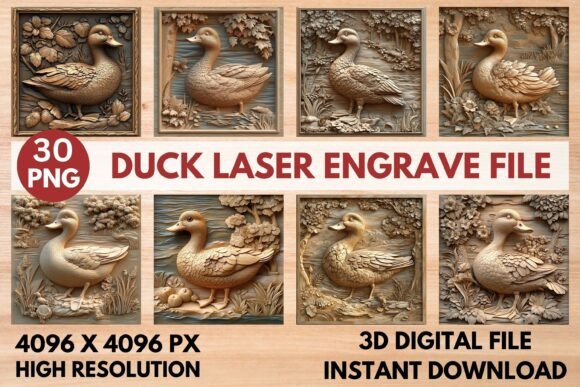
The resolution is another critical factor. With dimensions of 4096x4096 pixels, these files offer an immense amount of detail. This high pixel count ensures that even when you resize the image to fit a large cutting mat or a tiny keychain, the edges remain crisp. The transparent background included in the package further streamlines your workflow, allowing you to layer the design over other elements without wrestling with white boxes or unwanted borders.
What Is Included in the Design Set
When you acquire this premium resource, you are getting a comprehensive suite of assets tailored for different project needs. The package includes 15 coloring PNG files and 15 grayscale PNG files, all at the maximum resolution of 4096x4096 pixels. This variety gives you flexibility:
- Grayscale Files: These are the workhorses for direct laser engraving. They are pre-processed to ensure the best possible burn on lighter woods and materials that require subtle tonal shifts.
- Coloring Files: Perfect for hybrid projects where you might want to hand-color the final piece after engraving, or for use in digital mockups before you cut.
- Scalability: While the files are not editable in terms of vector manipulation, they can be resized freely within your software to fit any project dimension without losing quality.
This combination makes the Duck Laser Engrave File suitable for a wide range of applications, from intricate home decor pieces to personalized stationery and custom packaging.
Ideal Applications and Creative Projects
The true value of this design becomes apparent when applied to real-world projects. Because the file is optimized for both cutting and engraving, the possibilities are nearly endless. For entrepreneurs selling handmade goods, this design can elevate simple wooden coasters into premium gifts. Imagine a rustic duck silhouette engraved on birch plywood, paired with a heartfelt message for a wedding favor.
In the realm of home decor, the high-resolution nature of the PNG allows for detailed wall art. You can create framed prints on MDF or basswood that feature realistic textures, thanks to the smooth gradations in the grayscale version. Textiles also benefit from this clarity; if you have access to a laser capable of marking fabric, the design translates beautifully onto canvas tote bags or denim patches.
For educators and workshop leaders, this file serves as an excellent teaching tool. It demonstrates how digital art interacts with physical manufacturing processes. Students can learn about DPI, dithering patterns, and material interaction by experimenting with the provided settings on their own projects.
Optimizing Your Laser Settings
Even the best design file requires the right machine settings to shine. The Duck Laser Engrave File comes with recommended parameters that serve as a solid starting point, though fine-tuning may be necessary depending on your specific equipment and material thickness.
Glowforge Users
If you are using a Glowforge, the recommended settings are straightforward. Set your speed to 1000 and power to 90. Enable the "Grayscale - Vary Power" option to let the machine interpret the shades correctly. For the highest fidelity, select "Max Quality" and set the Lines Per Inch (LPI) to 270, increasing it slightly if you need finer detail. Typically, one pass is sufficient, and no masking is required. These settings work best on lighter woods like maple or birch, which provide excellent contrast against the charred engraving.
LightBurn and Other Software
For those using LightBurn, xTool Creative Space, or similar software, the approach involves using a dither filter. The Jarvis dither filter is highly recommended for optimal burning results with this specific file. Ensure you are importing the Grayscale PNG rather than the color version for engraving tasks. The software will automatically map the black-and-white values to your laser's power curve, creating the illusion of three-dimensional depth.
Important Considerations Before You Start
Before diving into your next project, it is vital to remember that this is a digital product intended for immediate download and use. There are no physical items shipped, so you must have the appropriate hardware to utilize the files. Additionally, while the files are high-resolution, they are raster-based (PNG), meaning they are not vectors. You cannot manipulate individual anchor points or change the shape of the duck itself, but you can scale them up or down significantly.
Material choice plays a huge role in the final outcome. The recommended settings are calibrated for lighter woods. If you plan to engrave on dark walnut, leather, or acrylic, you will likely need to adjust your power and speed settings to prevent burning through the material or achieving poor contrast. Always run a test square on a scrap piece of your chosen material before committing to the full design.
By understanding the capabilities of the Duck Laser Engrave File and pairing it with the correct machine settings, you can produce stunning, professional-grade engravings. Whether you are crafting personalized gifts for family, creating fashion prints for a boutique, or designing stylish tableware for a cafe, this high-resolution asset provides the foundation for success. It bridges the gap between digital creativity and tangible craftsmanship, empowering you to bring your ideas to life with confidence and precision.