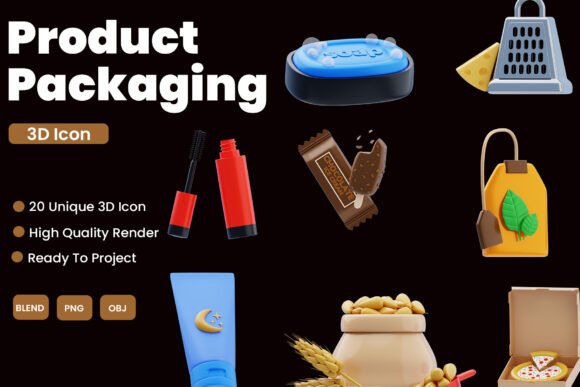
Evaluating the Product Packaging 3D Icon Pack for Modern Design Workflows
In the rapidly evolving landscape of digital design, the demand for high-quality visual assets has never been higher. Brands are moving away from flat, two-dimensional graphics toward more immersive and tactile representations of their products. This shift is particularly evident in e-commerce, user interface design, and marketing materials, where depth and realism can significantly enhance user engagement. For designers seeking to implement this trend without investing hundreds of hours in modeling from scratch, a Product Packaging 3D Icon Pack offers a compelling solution. These collections provide pre-rendered, customizable assets that bridge the gap between professional 3D rendering and efficient workflow management.
Understanding the Value of Pre-Made 3D Assets
The primary appeal of a dedicated icon pack lies in its ability to accelerate the design process while maintaining a consistent aesthetic. When creating branding materials or UI elements, consistency is key. Manually modeling various packaging types—such as boxes, bottles, jars, and pouches—requires not only technical proficiency in software like Blender but also a keen eye for lighting, texturing, and composition. A curated pack eliminates these variable factors by providing a unified visual language.
Unlike generic stock photography, which often suffers from inconsistent lighting angles and backgrounds, a specialized 3D icon pack ensures that every asset shares the same render settings. This uniformity is crucial for creating cohesive presentations, website headers, or app interfaces. The inclusion of multiple file formats, such as .blend, .obj, and .png, further enhances utility. Designers who prefer working directly in 3D software can modify the source files, while those focused on graphic design can utilize high-resolution transparent PNGs for immediate implementation.
Comparing 3D Icons to Traditional Design Alternatives
To determine if a Product Packaging 3D Icon Pack is the right choice for your project, it is helpful to compare it against other common design resources. Traditional vector icons, for instance, are lightweight and scalable but often lack the tactile realism that modern consumers associate with premium products. While vectors are excellent for minimalist interfaces, they may fall short when the goal is to evoke a sense of physical presence or luxury.
On the other end of the spectrum is custom 3D modeling. Hiring a 3D artist or dedicating internal resources to create bespoke models offers unlimited customization but comes with significant time and financial costs. For projects with tight deadlines or limited budgets, this approach is often impractical. A mid-tier solution involves using automated 3D mockup generators. While these tools are convenient, they frequently produce generic results that lack unique character. A high-quality icon pack strikes a balance by offering professionally crafted models that are distinct enough to stand out yet versatile enough to be adapted for various brands.
Key Features That Define Quality
Not all 3D asset packs are created equal. When evaluating a Product Packaging 3D Icon Pack, several technical and artistic features distinguish superior collections from mediocre ones. First, the geometry of the models should be clean and optimized. High-poly models may look detailed but can slow down performance in real-time applications or mobile apps. Conversely, low-poly models must still retain enough detail to appear realistic at close range.
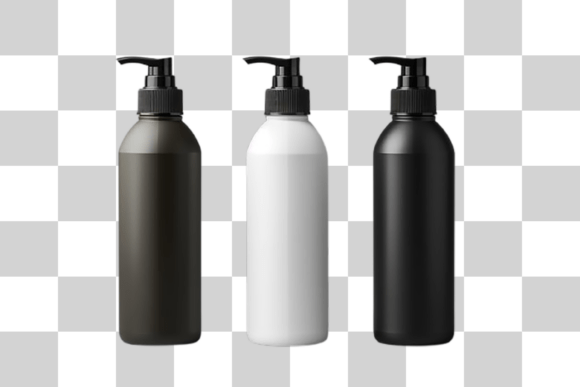
Another critical factor is the versatility of the file formats. The inclusion of native Blender files (.blend) is a significant advantage for designers who wish to tweak colors, shapes, or textures. This level of editability transforms static icons into dynamic assets that can be tailored to specific brand guidelines. Additionally, the provision of transparent background PNGs ensures that non-3D designers can integrate these assets seamlessly into Photoshop, Figma, or Canva projects without needing to remove backgrounds manually.
Lighting and material quality also play a pivotal role. High-quality packs use physically based rendering (PBR) materials that react realistically to light. This attention to detail ensures that the icons look professional across different contexts, whether displayed on a dark-mode mobile app or a bright, white-background e-commerce site.
Practical Use Cases and Integration Strategies
The application of a 3D icon pack extends beyond simple decoration. In e-commerce, these icons can serve as category markers, helping users navigate product lines more intuitively. For example, a skincare brand might use 3D rendered bottles and jars to represent different product categories, creating a more engaging shopping experience than standard text links.
In UI/UX design, 3D icons can guide user attention and improve usability. Their depth and shadow make them stand out against flat interfaces, serving as effective call-to-action elements. However, it is essential to use them sparingly. Overloading an interface with complex 3D elements can lead to visual clutter and increased load times. The best practice is to reserve 3D icons for key interactive elements or hero sections where they can have the most impact.
Marketing visuals also benefit significantly from these assets. Social media campaigns, email newsletters, and digital ads often require fresh, eye-catching graphics. A versatile icon pack allows marketing teams to quickly assemble custom visuals that align with seasonal promotions or new product launches without waiting for external design support.
Limitations and Considerations
While a Product Packaging 3D Icon Pack offers numerous benefits, it is not a universal solution. One limitation is the potential for overuse. As 3D aesthetics become more popular, there is a risk of designs looking generic if everyone uses the same popular asset packs. To mitigate this, designers should leverage the editable nature of the source files to customize colors, add unique labels, or combine elements in novel ways.
Additionally, technical compatibility can be a concern. Designers working exclusively with Adobe Illustrator or other vector-based tools may find it challenging to integrate 3D models without converting them to raster images, which limits scalability. In such cases, ensuring that the pack includes high-resolution PNGs is essential. Furthermore, while editable .blend files offer flexibility, they require a basic understanding of 3D software. Teams without 3D expertise may be restricted to using the pre-rendered images, limiting their ability to fully customize the assets.
Making the Right Choice for Your Project
Deciding whether to invest in a 3D icon pack depends on your specific project requirements, team skills, and budget. If you are working on a high-volume project that requires consistent, professional-grade visuals across multiple platforms, a comprehensive pack is likely a worthwhile investment. It provides a solid foundation that can be scaled and adapted as needed.
However, if your project demands highly specific, unconventional packaging shapes or unique artistic styles that deviate significantly from standard forms, custom modeling may still be necessary. Similarly, for ultra-minimalist brands where simplicity is paramount, flat vector icons might remain the more appropriate choice.
Ultimately, a Product Packaging 3D Icon Pack serves as a powerful tool in the modern designer’s arsenal. It offers a pragmatic balance between quality, efficiency, and customization. By understanding its strengths and limitations, designers can make informed decisions that enhance their visual content while respecting project constraints. Whether used for subtle UI enhancements or bold marketing statements, these assets help bring digital products to life with a touch of realistic charm.