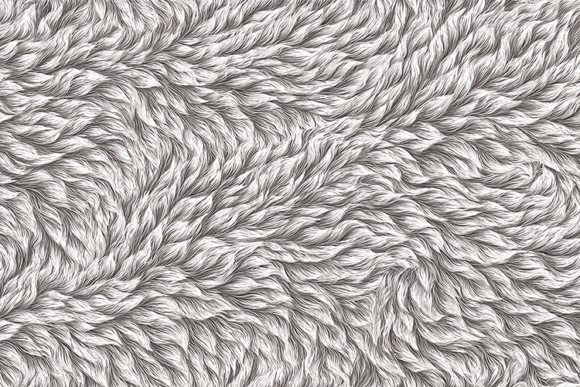
Beige Wavy Fur Seamless Texture
In the world of digital design, texture is often the subtle element that transforms a flat composition into something tangible and engaging. Among the vast array of available resources, the Beige Wavy Fur Seamless Texture stands out as a versatile asset for creators who value both realism and aesthetic warmth. This high-resolution resource, available as a print-ready JPG file at 5824 x 3264 pixels, offers more than just a background; it provides a tactile quality that can elevate fashion mockups, interior visualizations, and branding materials alike.
Understanding how to effectively integrate such a specific textural element requires a blend of technical knowledge and creative intuition. Whether you are a seasoned graphic designer or a hobbyist exploring digital scrapbooking, mastering the use of fur textures can add a layer of sophistication and coziness to your work that solid colors simply cannot achieve.
The Appeal of Organic Softness in Digital Design
The modern digital landscape is often dominated by sleek, minimalist interfaces and sharp vector graphics. While these styles have their place, there is a growing demand for designs that evoke emotion and sensory response. This is where the beige wavy fur texture excels. The color beige is inherently neutral, acting as a sophisticated bridge between stark white and warm earth tones. It suggests comfort, luxury, and natural elegance without overpowering other design elements.
The "wavy" aspect of the fur adds dynamic movement. Unlike static patterns, the undulating lines of the fur guide the viewer’s eye across the canvas, creating a sense of flow. When you use a seamless texture, you gain the freedom to tile the image infinitely without visible breaks or edges. This is crucial for large-format prints, website backgrounds, or 3D modeling environments where continuity is key to maintaining immersion.
Practical Applications Across Creative Industries
The utility of this high-quality JPG file extends far beyond simple background placement. Its high resolution ensures that even when scaled or cropped, the individual strands of fur remain crisp and detailed. Here is how different professionals can leverage this asset:
- Fashion and Textile Design: Before committing to expensive fabric production, designers can use this texture to visualize how a faux fur coat, rug, or accessory might look. It allows for rapid prototyping of patterns and color combinations in a digital space.
- Interior Visualization: Architects and interior designers can apply this texture to 3D models of throw pillows, rugs, or wall panels. The realistic lighting interaction inherent in the high-quality render helps clients understand the mood of a space before any physical items are purchased.
- Digital Scrapbooking and Stationery: For those creating wedding invitations, baby announcements, or personal journals, the soft beige tone provides a gentle, inviting backdrop. It pairs exceptionally well with handwritten fonts and floral illustrations, adding a touch of rustic charm.
- Product Packaging: Luxury brands often seek packaging that feels premium to the touch. Using this texture in digital mockups for box designs or label backgrounds can convey a sense of high-end quality and organic materials, appealing to eco-conscious consumers.
Technical Considerations for Best Results
To get the most out of the Beige Wavy Fur Seamless Texture, it is important to understand how to manipulate it within your design software. Since the file is provided in JPG format at 5824 x 3264 pixels, it is optimized for both screen and print. However, working with such detailed images requires attention to blending modes and opacity settings.
When overlaying this texture onto other images, avoid simply placing it on top at 100% opacity. Instead, experiment with blending modes such as Overlay, Soft Light, or Multiply. These modes allow the underlying colors to show through while retaining the textural detail of the fur. Adjusting the opacity to between 20% and 40% often yields the most natural result, ensuring the texture enhances rather than dominates the composition.
For print projects, ensure your document color mode is set to CMYK if your printer requires it, although many modern digital printers handle RGB files from high-resolution sources effectively. Always check the DPI settings; while the pixel dimensions are generous, confirming a 300 DPI output will guarantee sharpness in physical prints like posters or brochures.
Creative Variations and Styling Tips
While the beige tone is versatile, you may want to adapt the texture to fit specific brand guidelines or artistic visions. Color grading tools in software like Photoshop or Lightroom can shift the hue slightly toward warmer golds or cooler grays without losing the integrity of the fur details. This flexibility allows one asset to serve multiple projects.
Consider combining this texture with contrasting elements. The softness of the fur pairs beautifully with hard, geometric shapes. For example, placing bold, sans-serif typography over the wavy fur background creates a striking juxtaposition between the organic and the industrial. This technique is particularly effective in poster design and social media graphics where grabbing attention is paramount.
Another approach is to use the texture as a mask. By applying the fur pattern as a clipping mask to text or shapes, you can create letters or objects that appear to be made of fur. This adds a playful yet sophisticated dimension to logos or headline treatments, making them memorable and tactile.
Enhancing User Experience Through Texture
For web designers and UI/UX specialists, incorporating texture must be done with caution to avoid clutter. The Beige Wavy Fur Seamless Texture can be used subtly in hero sections or footer areas to break up large blocks of white space. It adds depth without distracting from the primary content or call-to-action buttons.
When using this texture on digital platforms, consider file size optimization. While the original JPG is high quality for print, web versions should be compressed appropriately to ensure fast loading times. Tools that reduce file size without significant visual degradation are essential here. The goal is to maintain the cozy, realistic look while ensuring a smooth user experience across devices.
Final Thoughts on Integrating Texture
Incorporating a Beige Wavy Fur Seamless Texture into your workflow is an investment in the emotional resonance of your designs. It moves beyond mere aesthetics to evoke feelings of comfort, luxury, and natural beauty. By understanding the technical aspects of seamless tiling, blending modes, and resolution management, you can unlock the full potential of this asset.
Whether you are designing a high-fashion editorial, a cozy home decor catalog, or a unique digital invitation, this texture offers a reliable foundation for creativity. It encourages you to think about how your audience perceives not just the look, but the feel of your work. In a digital age that often feels cold and distant, adding a touch of warm, wavy fur can make your designs feel distinctly human and inviting.
Remember, the best designs are those that balance innovation with usability. Use this texture as a tool to enhance your message, not obscure it. Keep your layouts clean, let the texture breathe, and allow its natural rhythm to guide the viewer’s journey through your content. With practice, you will find that such organic elements become indispensable parts of your creative toolkit, offering endless possibilities for expression and connection.